The Translation Battle: Google vs. GPT 🥊
Language models, especially large language models (LLMs), contribute a great deal to our everyday lives. The main challenge I have identified across various projects is evaluating and monitoring the quality of model outputs: both when choosing the right model for a task and when monitoring its performance in customer-facing applications.
In this article, I’ll walk you through a short study I conducted comparing Google Translate with GPT-4o and GPT-4o mini. The results are interesting 🤩
Messages #
Database #
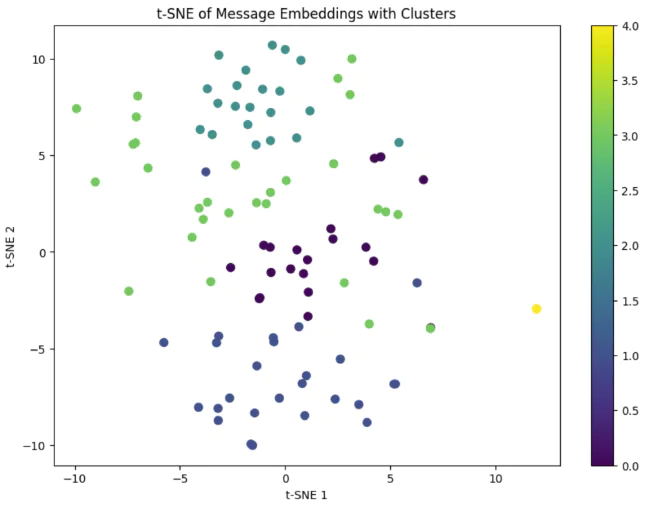
My research grew out of a need in a separate project that involved large numbers of messages in different languages (for this demonstration, we’ll use the Arabic messages) and translating them into a common language. The messages are loaded into MongoDB in real time. We have around 10,000 messages. I’ve included some examples below.
| content | timestamp | message_id | channel | _id |
|---|---|---|---|---|
| “أخبار عاجلة: زيادة أسعار النفط عالميًا” | 2024-11-04 09:15:00 | 1001 | News_Channel_1 | 1 |
| “التكنولوجيا الحديثة تغيّر شكل الحياة اليومية” | 2024-11-04 09:20:00 | 1002 | News_Channel_2 | 2 |
| “توقعات بطقس ممطر في نهاية الأسبوع” | 2024-11-04 09:25:00 | 1003 | News_Channel_1 | 3 |
| “مؤشرات اقتصادية تظهر تحسنًا طفيفًا” | 2024-11-04 09:30:00 | 1004 | News_Channel_3 | 4 |
| “الحكومة تعلن عن خطط جديدة لتطوير التعليم” | 2024-11-04 09:35:00 | 1005 | News_Channel_1 | 5 |
| “تحديثات حول حملة التطعيم الوطنية ضد الأمراض” | 2024-11-04 09:40:00 | 1006 | News_Channel_2 | 6 |
| “استثمارات جديدة في قطاع الطاقة المتجددة” | 2024-11-04 09:45:00 | 1007 | News_Channel_3 | 7 |
| “الرئيس يلقي خطابًا هامًا حول الاقتصاد” | 2024-11-04 09:50:00 | 1008 | News_Channel_1 | 8 |
| “الرياضة المحلية تشهد منافسات قوية هذا الموسم” | 2024-11-04 09:55:00 | 1009 | News_Channel_2 | 9 |
| “افتتاح معرض الفنون الدولي في العاصمة” | 2024-11-04 10:00:00 | 1010 | News_Channel_3 | 10 |
Cost #
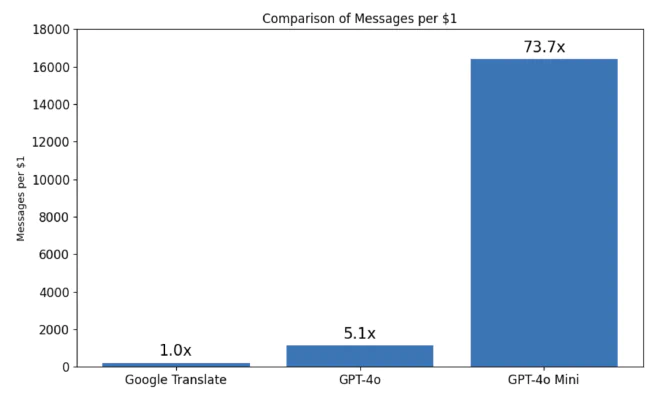
I calculated statistically how many messages $1 would cover with each service. As you can see, the difference between Google Translate and GPT-4o is relatively small, but compared with GPT-4o mini, there’s a 74-fold gap: 16,400 messages per dollar with mini versus 223 messages per dollar with Google, a significant saving worth exploring further.
Structured Output #
Before we continue, I wanted to tell you about Structured Output from OpenAI, which launched three months ago. Until now, to define a fixed response format for GPT models, we would set response_format to json_object, along with a detailed explanation of the JSON format we hoped to receive, and that was it.
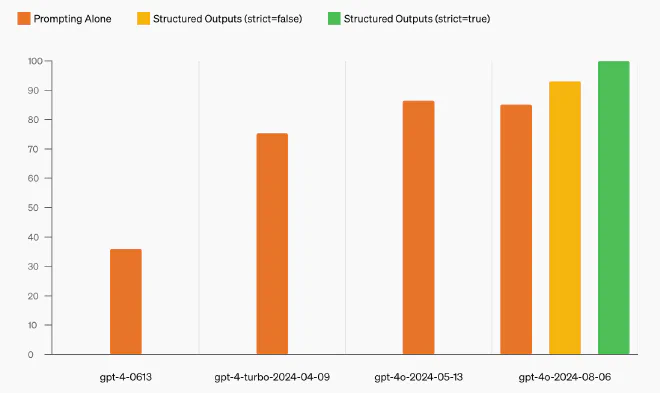
Structured Output lets us treat model responses as objects with 100% certainty, saving us a lot of headaches. We now also define those objects using Pydantic. Feeling a little confused? Let’s look at an example.
Example #
For this demonstration, we’ll build a bot that takes HTML and extracts the title, paragraphs, links, and images on its own. I know this can be solved with Regex, but I decided to use a simple example.
Step 1: Imports and Setting the OpenAI Key #
import openai
import os
import json
from dotenv import load_dotenv
from pydantic import BaseModel
from typing import List, Optional

# Load environment variables and set API key
load_dotenv()
openai.api_key = os.getenv('OPENAI_API_KEY')
As with any Python script, we’ll start with a few imports and set the OpenAI key, which we have, of course, stored in the environment rather than in the code.
Step 2: Defining Webpage #
class Webpage(BaseModel):
    title: str
    paragraphs: Optional[List[str]]
    links: Optional[List[str]]
    images: Optional[List[str]]
With the new approach, we can easily build a pydantic object, send it to the model along with the messages, and receive a response that conforms to that object. As you can see, apart from the title, I defined lists of optional strings to represent the HTML tags.
Using pydantic, we’ll validate the response and force the model to answer in the desired format.
Step 3: OpenAI Client #
class OpenAIClient:
    def __init__(self, model: str = "gpt-4o-2024-08-06"):
        self.model = model

    def parse_html(self, html_content: str) -> Optional[Webpage]:
        try:
            response = openai.beta.chat.completions.parse(
                model=self.model,
                messages=[
                    {"role": "system", "content": "Parse HTML and return page components."},
                    {"role": "user", "content": html_content}
                ],
                response_format=Webpage
            )
            return Webpage(**json.loads(response.choices[0].message.content))
        except Exception as e:
            print(f"API error: {e}")
            return None
We defined a OpenAIClient interface that communicates with OpenAI. Eagle-eyed readers will spot two interesting things in the main function:
openai.beta.chat.completions.parse: Unlike the usual way we call OpenAI’s language models, this time we’ll call them throughbeta.response_format=Webpage: We’ll force the model’s response to be of theWebpageobject type we defined.
Step 4: Processing HTML and Printing the Results #
def process_html_content(html_content: str):
    client = OpenAIClient()
    webpage = client.parse_html(html_content)
    if webpage:
        print(f"Title: {webpage.title}")
        print("Paragraphs:", webpage.paragraphs)
        print("Links:", webpage.links)
        print("Images:", webpage.images)
I built a wrapper function that uses OpenAIClient and prints the results for us. Notice how convenient this is: the object we get back is easy to access, and we can treat it just like any other pydantic object.
Step 5: Run It! #
# Sample HTML content for demonstration
html_content = """
    <html>
        <title>Structured Outputs Demo</title>
        <body>
            <img src="test.gif"/>
            <p>Hello world!</p>
        </body>
    </html>
"""

# Run the HTML processing
process_html_content(html_content)
I set up a sample HTML file in an environment variable and passed it into our wrapper function, process_html_content. Here’s the output:
Title: Structured Outputs Demo
Paragraphs: ['Hello world!']
Links: None
Images: ['test.gif']
Pretty cool, right?
Format Generator #
After working on several projects with Structured Output, I found that I needed to update ChatGPT so it would know about this new functionality. So I created a Custom GPT called Format Generator to help streamline the workflow with Structured Output, and function calling along the way.
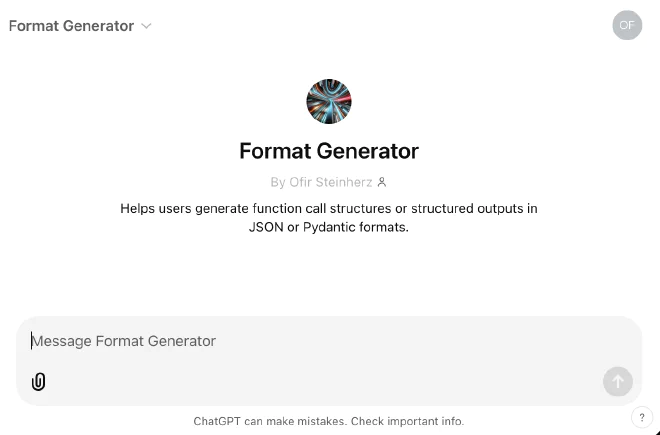
You’re welcome to give it a try! 🏋🏼♂️
Translation Evaluation #
There are many methods for comparing texts to assess the quality of a translation model. A quick online search turns up metrics such as BLEU, METEOR, DEMETR, and others. I decided to take a slightly different approach, without knowing what the results would be.
Here’s the plan:
- First, we’ll create a vector (my article on the topic) to represent each sentence and its translation in vector space. My hypothesis is that the closer the sentences are semantically, the better the translation.
- Second, we’ll identify place names and entities in the messages. If a place is missing from the translation, we can say that the translation is less successful.
- Third, we’ll put the comparisons into practice, comparing both semantic similarity and entities.
- Fourth, we’ll analyze the results and determine which service is best.
Ultimately, we’ll have a score for each service (Google and the GPT models) that estimates the quality of its translations. As a reminder, the source messages are in Arabic, and we’re translating them into English and Hebrew.
Step One: Vector Representation #
It’s clear to all of us that the sentences “The blue ball rolled” and “The green ball rolled” are semantically close. The problem is that we’re comparing sentences in different languages. That means the dataset used to train the model needs to include a variety of languages.
To test the embedding models, I took identical sentences in different languages: “مرحبا بكم في عالم الترجمة الآلية.” and “Welcome to the world of machine translation”.
I first used OpenAI’s text-embedding-3-small model, and the semantic similarity between the sentences came out to 55%, too low to be useful.
I then found the distilbert-multilingual model, which was trained on around 50 different languages. With this model, the semantic similarity between those same sentences was 97%.
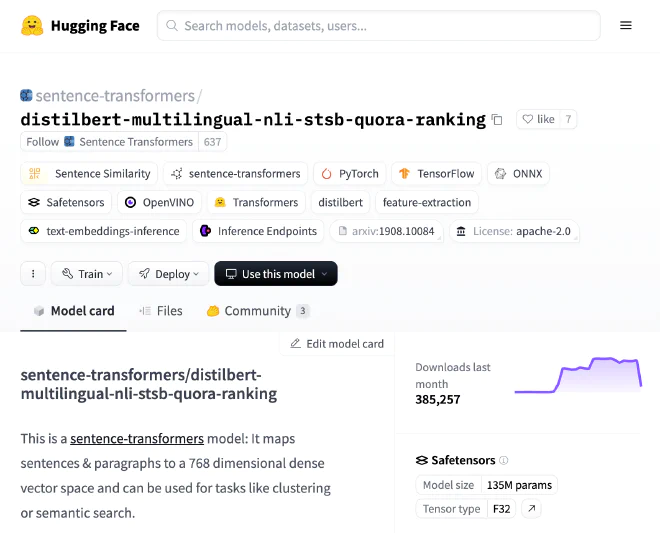
We found a suitable model for comparing sentences, and to finish this part, I compared all the source messages with their translations from each service we’re evaluating. I’ll also mention that I added processing steps for the NER models’ outputs, but I won’t go into those in this post.
Step Two: Entity Recognition #
NER, or Named-entity recognition, is the process of identifying entities (places, dates, names, and more) in text. We’ll run NER on all the source messages and their translations, then check whether each entity matches. A missing or extra entity will lower the service’s final score.
I used a dedicated NER model for each language. I was concerned that this might affect the measurements, but I decided to work on the assumption that these models perform relatively similarly.
NER in English #
I used the flair/ner-english model. Here’s an example input and output:
if __name__ == "__main__":
   ner = EnglishNER()
   text_en = """
   George Washington went to Washington. He was the first president of the United States.
   """

   combined_entities_en = ner.process_text(text_en)

   print("Combined Entities:")
   for entity in combined_entities_en:
       print(entity)
Combined Entities:
{'entity': 'PER', 'score': 0.99, 'word': 'George Washington', 'start': 5, 'end': 22}
{'entity': 'LOC', 'score': 0.98, 'word': 'Washington', 'start': 31, 'end': 41}
{'entity': 'LOC', 'score': 0.99, 'word': 'United States', 'start': 77, 'end': 90}
NER in Arabic #
I used the camelbert-msa-ner model. Here’s an example input and output:
if __name__ == "__main__":
   ner = ArabicNER()
   text_ar = """
   الملك سلمان بن عبد العزيز، الذي وُلد في الرياض عام 1935، هو ملك المملكة العربية السعودية منذ عام 2015.
   """

   combined_entities_ar = ner.process_text(text_ar)

   print("Combined Entities:")
   for entity in combined_entities_ar:
       print(entity)
Combined Entities:
{'entity': 'B-PERS', 'score': 0.99, 'index': 2, 'word': 'سلمان بن عبد العزيز', 'start': 11, 'end': 30}
{'entity': 'B-LOC', 'score': 0.99, 'index': 10, 'word': 'الرياض', 'start': 45, 'end': 51}
{'entity': 'B-LOC', 'score': 0.98, 'index': 17, 'word': 'المملكة العربية السعودية', 'start': 69, 'end': 93}
NER in Hebrew #
I used the avichr/heBERT_NER model. Here’s an example input and output:
if __name__ == "__main__":
   ner = HebrewNER()
   text_he = """
   יצחק רבין, שנולד בתל אביב בשנת 1922, היה ראש הממשלה של מדינת ישראל בין השנים 1974 ל-1977 ושוב בין 1992 ל-1995.
   """

   combined_entities_he = ner.process_text(text_he)

   print("Combined Entities:")
   for entity in combined_entities_he:
       print(entity)
Combined Entities:
{'entity': 'B_PERS', 'score': 0.98, 'index': 1, 'word': 'יצחק רבין', 'start': 5, 'end': 14}
{'entity': 'B_LOC', 'score': 0.86, 'index': 5, 'word': 'בתל אביב', 'start': 22, 'end': 30}
{'entity': 'B_DATE', 'score': 0.93, 'index': 8, 'word': '1922', 'start': 36, 'end': 40}
{'entity': 'B_ORG', 'score': 0.78, 'index': 14, 'word': 'מדינת ישראל', 'start': 60, 'end': 71}
{'entity': 'B_DATE', 'score': 0.91, 'index': 18, 'word': '1974', 'start': 82, 'end': 86}
{'entity': 'B_DATE', 'score': 0.73, 'index': 20, 'word': '- 1977', 'start': 88, 'end': 93}
{'entity': 'B_DATE', 'score': 0.90, 'index': 24, 'word': '1992', 'start': 103, 'end': 107}
{'entity': 'B_DATE', 'score': 0.71, 'index': 26, 'word': '- 1995', 'start': 109, 'end': 114}
For each language and entity, we received a score indicating how confident the model was in its prediction, along with the entities’ positions in the sentence and their types. Note that we have dates in Hebrew, but I ignored them in the comparisons.
Step Three: Running the Pipeline #
Now that we have a way to measure semantic similarity between two sentences and check for matching entities across sentences in different languages, all that’s left is to run the evaluation pipeline we built.
We’re evaluating three services’ translations into two languages. That gives us two measurements for each service. Below, I’ve included one measurement for GPT-4o:
{
  "Row 0": {
    "gpt-4o - Arabic to Hebrew Evaluation": {
      "reference": "الأرصاد الجوية تتوقع هطول أمطار غزيرة في مدينة جدة غدًا",
      "candidate": "השירות המטאורולוגי צופה גשמים כבדים בעיר ג'דה מחר",
      "entity_comparison": {
        "missing": [],
        "extra": [],
        "matching": [["جدة", "בעיר ג׳דה"]]
      },
      "semantic_similarity": 0.9624,
      "ner_match_score": 1.0,
      "final_score": 0.9624,
      "has_entities": true
    },
    "gpt-4o - Arabic to English Evaluation": {
      "reference": "الأرصاد الجوية تتوقع هطول أمطار غزيرة في مدينة جدة غدًا",
      "candidate": "The meteorological service expects heavy rainfall in the city of Jeddah tomorrow",
      "entity_comparison": {
        "missing": [],
        "extra": [],
        "matching": [["جدة", "Jeddah"]]
      },
      "semantic_similarity": 0.9573,
      "ner_match_score": 1.0,
      "final_score": 0.9573,
      "has_entities": true
    }
  }
}
What are we looking at here?
reference: The source message in Arabic.candidate: The translation into English or Hebrew.entity_comparison: An array of arrays classifying whether the entities appear in the translation.semantic_similarity: Semantic similarity between the sentences.ner_match_score: The NER score, affected by the number of missing or extra entities.final_score: The final score.has_entities: An indicator of whether NER entities are present, since some sentences contain no entities.
Step Four: Analysis #
In the final step, we’ll go through several charts I created to help us reach a bottom line: what is the best way to translate?
Distribution of NER Scores #
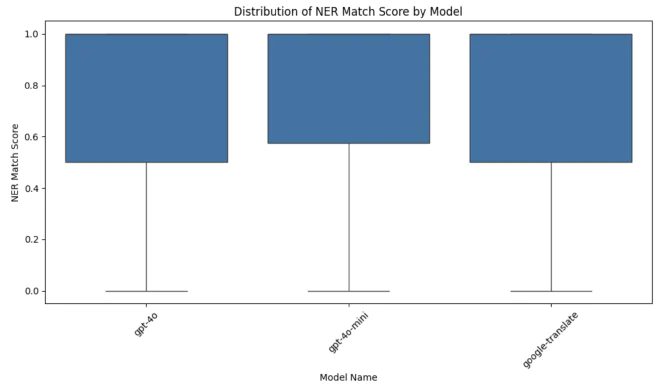
Looking at the NER match scores, we can see that the distributions for the three services are similar, suggesting that their entity translation quality is relatively similar. Some scores go as low as 0, but since we see the same behavior with Google’s service, I would say the services perform equally well when it comes to translating entities.
Distribution of Semantic Similarity #
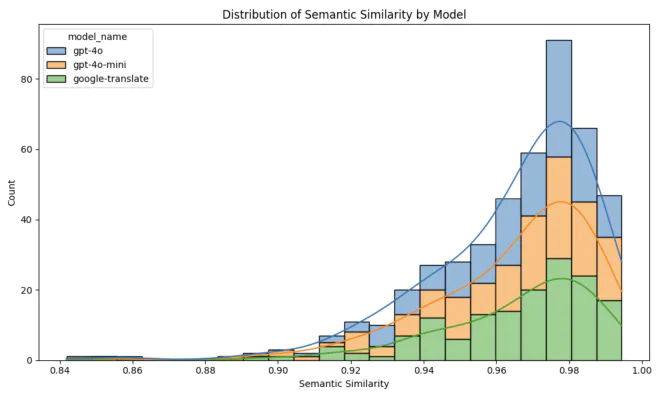
All the services achieved high percentages of semantic similarity between the original sentence and its translation. Still, we can see that GPT-4o performed best, while Google Translate’s results were more spread out and slightly lower.
Comparing Hebrew and English Translations #
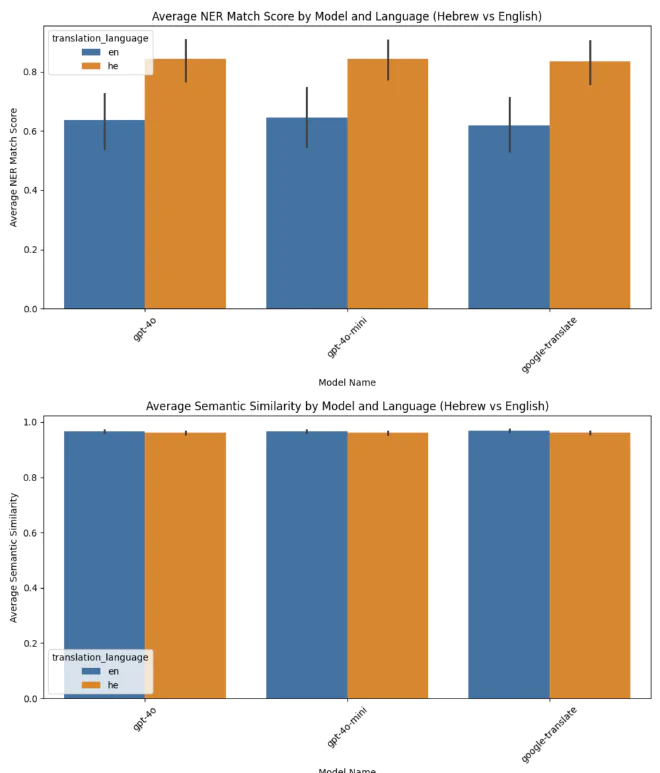
We’ve reached the bottom line: which model was better? We can see that, in terms of NER, all three services struggled with translating into English but were relatively successful at translating into Hebrew. My hypothesis is that this happened because Hebrew and Arabic are Semitic languages and are closer to each other than to English.
Semantically, there is no significant difference between Hebrew and English.
Summary #
Based on the tests I ran, there is no substantial difference between the performance of the language models and Google Translate, so in production, we used GPT-4o mini for translation when needed. Thanks to this research, we significantly reduced the overall need for translation, and it taught me a great deal about monitoring language model outputs.
I hope you enjoyed this! I’d love to hear your feedback and suggestions for improving translation evaluation.
See you in the next article!