We all know the situation: at work, we have the most advanced tools, our setup is comfortable, and everything is great. But when it comes to personal projects, something else gets in the way, whether it’s a computer that isn’t working, the development environment, or the software on our machine. Today, I’ll talk about how we can take a schema, build a fictional dataset, run SQL in Google BigQuery, and answer some questions. The questions we’ll answer come from Arena Games - Data Analysis, created by Ram Kedem and published for practice. All credit for the questions goes to UpScale Analytics.
The database structure includes data about games and players’ seasons:
graph TD;
A[game_sessions] -->|game_id| B[games];
A -->|player_id| C[players];
A -->|session_id| D[session_details];
C -->|player_id| E[paying_method];
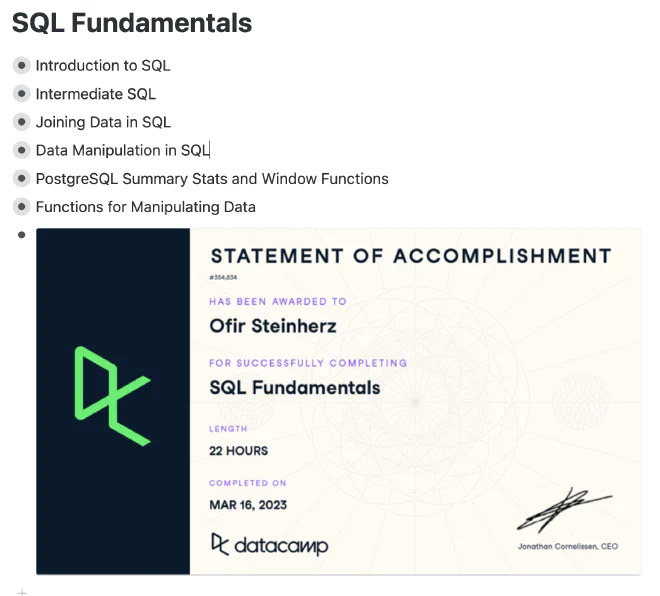
Before we begin, I recommend “SQL Fundamentals” on Datacamp. It’s a collection of courses that teach you how to write complex queries, with short videos and practice throughout. I used Workflowy to take notes on the courses.
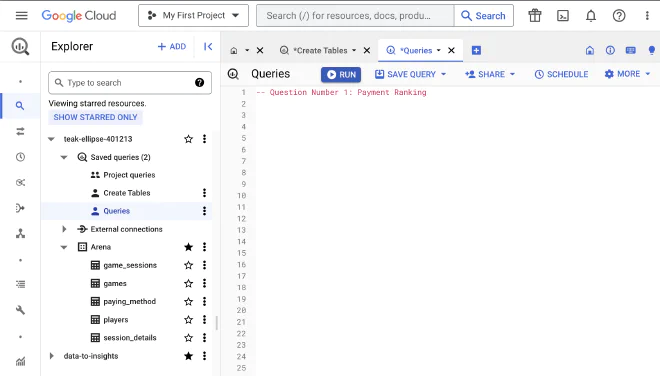
Google BigQuery is one of the most advanced tools on the market for querying large databases quickly and easily. Let’s create a dataset and build it step by step:
Go to Google Cloud and sign up with your Google account.
Open BigQuery and create a new, empty dataset. I called mine “Arena.”
The link I shared above includes the database schema. It is designed for an MSSQL database, while BigQuery supports “BigQuery Standard SQL,” a slightly different version with changes and improvements. So we’ll need to convert the structure into a format BigQuery recognizes.
I copied the schema into ChatGPT (using the GPT-4 model) and asked it to perform the necessary conversion into a format BigQuery recognizes. I’ve included the result below. Note that Arena is preceded by the project ID containing the dataset we’re building.
-- Structure for game_sessions table
CREATETABLE`teak-ellipse-401213.Arena.game_sessions`(session_idINT64NOTNULL,session_begin_dateTIMESTAMP,session_end_dateTIMESTAMP,player_idINT64,game_idINT64);-- Structure for games table
CREATETABLE`teak-ellipse-401213.Arena.games`(idINT64NOTNULL,game_nameSTRING);-- Structure for paying_method table
CREATETABLE`teak-ellipse-401213.Arena.paying_method`(player_idINT64NOTNULL,credit_card_typeSTRINGNOTNULL,credit_card_numberSTRINGNOTNULL);-- Structure for players table
CREATETABLE`teak-ellipse-401213.Arena.players`(player_idINT64NOTNULL,first_nameSTRING,last_nameSTRING,email_addressSTRING,genderSTRING,age_groupSTRING,countrySTRING,citySTRING,street_addressSTRING);-- Structure for session_details table
CREATETABLE`teak-ellipse-401213.Arena.session_details`(session_idINT64NOTNULL,action_idINT64NOTNULL,action_typeSTRINGNOTNULL,amountNUMERIC);
Now that we’ve created the table structures, all that’s left is to generate synthetic data using ChatGPT. I think it’s important to stick as closely as possible to the original database format, so I included examples in the prompt, including some from the database file. I then built Python functions that helped generate queries to insert the data into our tables using the Faker library:
generate_game_sessions - A function that generates the sessions. We have a start and end date, a player, and a game.
generate_games - A function that generates the games. We have the game’s ID and name.
generate_paying_method - A function that generates the payment method for the game. Faker even supports generating a fictional credit card number.
generate_players - A function that generates the players and their identifying details.
generate_session_details - A function that generates the details for each session and its profit/loss data.
fromfakerimportFakerimportrandomfake=Faker()defgenerate_game_sessions(num_rows=100):query="INSERT INTO `teak-ellipse-401213.Arena.game_sessions` (session_id, session_begin_date, session_end_date, player_id, game_id) VALUES "values=[]foriinrange(1,num_rows+1):session_id=ibegin_date=fake.date_time_this_decade()end_date=fake.date_time_between_dates(begin_date)player_id=random.randint(1,100)game_id=random.randint(1,4)values.append(f"({session_id}, TIMESTAMP('{begin_date}'), TIMESTAMP('{end_date}'), {player_id}, {game_id})")query+=", ".join(values)returnquerydefgenerate_games(num_rows=100):query="INSERT INTO `teak-ellipse-401213.Arena.games` (id, game_name) VALUES "values=[]foriinrange(1,num_rows+1):game_name=fake.word()values.append(f"({i}, '{game_name}')")query+=", ".join(values)returnquerydefgenerate_paying_method(num_rows=100):query="INSERT INTO teak-ellipse-401213.Arena.paying_method (player_id, credit_card_type, credit_card_number) VALUES "values=[]card_types=['visa','mastercard','amex']foriinrange(1,num_rows+1):player_id=random.randint(1,100)card_type=random.choice(card_types)card_number=fake.credit_card_number(card_type=card_type)values.append(f"({player_id}, '{card_type}', '{card_number}')")query+=", ".join(values)returnquerydefgenerate_players(num_rows=100):query="INSERT INTO `teak-ellipse-401213.Arena.players` (player_id, first_name, last_name, email_address, gender, age_group, country, city, street_address) VALUES "values=[]foriinrange(1,num_rows+1):first_name=fake.first_name()last_name=fake.last_name()email=fake.email()gender=random.choice(['Male','Female'])age_group=random.choice(['10-21','21-30','31-40','41-50','51-60'])country=fake.country()city=fake.city()address=fake.street_address()values.append(f"({i}, '{first_name}', '{last_name}', '{email}', '{gender}', '{age_group}', '{country}', '{city}', '{address}')")query+=", ".join(values)returnquerydefgenerate_session_details(num_rows=100):query="INSERT INTO `teak-ellipse-401213.Arena.session_details` (session_id, action_id, action_type, amount) VALUES "values=[]action_types=['gain','loss']foriinrange(1,num_rows+1):session_id=random.randint(1,100)action_id=iaction_type=random.choice(action_types)amount=round(random.uniform(100,1000),2)values.append(f"({session_id}, {action_id}, '{action_type}', {amount})")query+=", ".join(values)returnquery# Function to get all the insert queriesdefget_insert_queries(num_rows=100):return{'game_sessions':generate_game_sessions(num_rows),'games':generate_games(num_rows),'paying_method':generate_paying_method(num_rows),'players':generate_players(num_rows),'session_details':generate_session_details(num_rows)}# Get all insert queriesinsert_queries=get_insert_queries(100)# File path where you want to save the queriesfile_path="insert_queries.sql"# Open the file in write modewithopen(file_path,'w')asfile:# Iterate over each table and its corresponding queryfortable,queryininsert_queries.items():# Write the comment and the query to the filefile.write(f'-- Insert data into {table}\n')file.write(query)file.write('\n\n')
After running this code, we’ll get 5 queries saved in a file called “insert_queries.sql.” We’ll run the queries in BigQuery, and then we’ll be ready to start answering the questions.
-- Insert data into game_sessions
INSERTINTO`teak-ellipse-401213.Arena.game_sessions`(session_id,session_begin_date,session_end_date,player_id,game_id)VALUES(1,TIMESTAMP('2022-04-18 07:48:12')-- Insert data into games
INSERTINTO`teak-ellipse-401213.Arena.games`(id,game_name)VALUES(1,'letter')-- Insert data into players
INSERTINTO`teak-ellipse-401213.Arena.players`(player_id,first_name,last_name,email_address,gender,age_group,country,city,street_address)VALUES(1,'Misty','Harper','melissawarner@example.net','Female','41-50','Western Sahara','Howardstad','53600 Craig Key')-- Insert data into paying_method
INSERTINTO`teak-ellipse-401213.Arena.paying_method`(player_id,credit_card_type,credit_card_number)VALUES(2,'visa','4812645610428841')-- Insert data into session_details
INSERTINTO`teak-ellipse-401213.Arena.session_details`(session_id,action_id,action_type,amount)VALUES(36,1,'gain',890.87)
Now that we’ve set up and populated the database, we can start running queries.
As I work through the questions, I’ll add more detailed notes about my approach whenever I feel they’re needed. If you’d like to see another approach to solving them and a more in-depth explanation, I recommend watching the Livestream by my good friend Amit Grinson, who solved the same questions a few months ago.
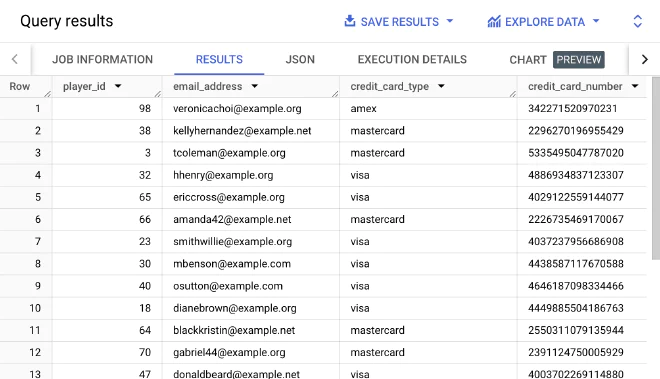
Create a report that displays for each player a single payment method, according to the following preference: American Express, Mastercard, Visa.
That is, if the player has an American Express payment method, we will display it. Otherwise, we will display Mastercard, and if none of the above, we will display Visa.
To solve this question, I used ROW_NUMBER(), which helped me number the credit cards in order for each player’s PARTITION. With this ordering, I could filter for the first position, payment_index, in the query itself, giving me the player’s payment method according to the requested order.
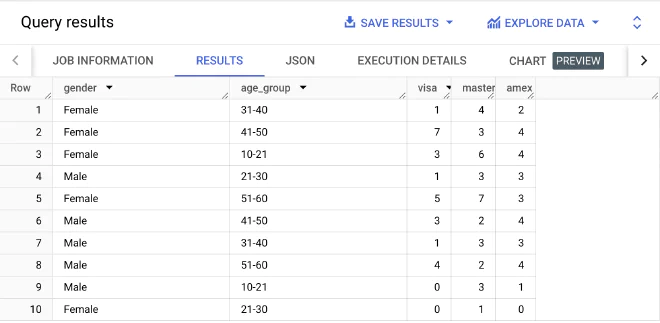
Create a report that displays the number of players who carry each type of card. Break it down by each gender and age group.
What I found interesting about this question was creating the `PIVOT`: before the `FOR`, we specify which aggregate operation we want to perform, and after it, we specify what to apply it to.
-- Question Number 2: Payment Grouping
WITHplayers_paymentAS(SELECTplayers.player_idASplayer_id,gender,credit_card_type,age_groupFROM`teak-ellipse-401213.Arena.paying_method`ASpaymentJOIN`teak-ellipse-401213.Arena.players`asplayersONpayment.player_id=players.player_id)SELECT*FROMplayers_paymentPIVOT(COUNT(DISTINCTplayer_id)FORcredit_card_typeIN('visa','mastercard','amex'))
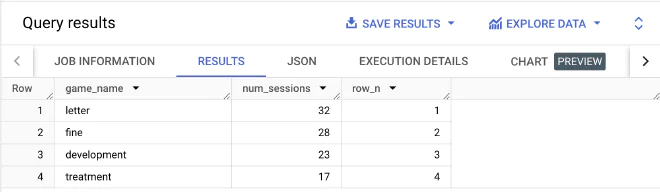
Display the number of sessions for each game. Rank the output according to the number of game sessions, from highest to lowest.
-- Question Number 3: Games per Session
WITHsession_rankAS(SELECTgame_name,COUNT(game_id)ASnum_sessionsFROM`teak-ellipse-401213.Arena.game_sessions`asgame_sessionsJOIN`teak-ellipse-401213.Arena.games`asgamesONgame_sessions.game_id=games.IDGROUPBYgame_name)SELECTgame_name,num_sessions,RANK()OVER(ORDERBYnum_sessionsDESC)ASrow_nFROMsession_rankORDERBYnum_sessionsDESC
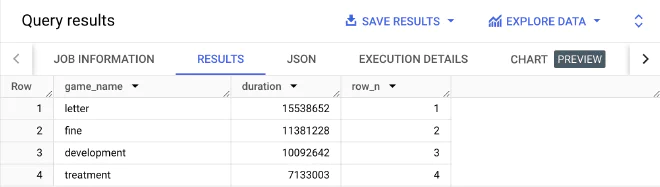
Rank the games according to the total amount of minutes played in each one.
-- Question Number 4: Total Game Duration
SELECTgame_name,duration,RANK()OVER(ORDERBYdurationDESC)ASrow_nFROM(SELECTgame_id,SUM(TIMESTAMP_DIFF(session_end_date,session_begin_date,MINUTE))ASdurationFROM`teak-ellipse-401213.Arena.game_sessions`asgame_sessionsGROUPBYgame_id)ASgames_durationsJOIN`teak-ellipse-401213.Arena.games`asgamesONgames_durations.game_id=games.IDORDERBYdurationDESC
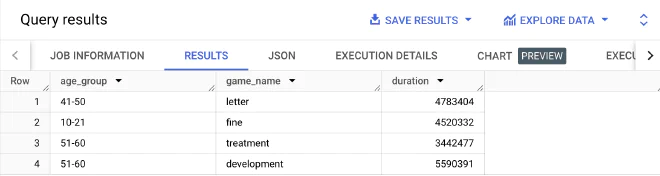
For each age-group display the game in which most time was spent
-- Question Number 5: Duration per Age Group
WITHgames_durationsAS(SELECTage_group,game_name,SUM(TIMESTAMP_DIFF(session_end_date,session_begin_date,MINUTE))ASdurationFROM`teak-ellipse-401213.Arena.game_sessions`asgame_sessionsJOIN`teak-ellipse-401213.Arena.players`asplayersONgame_sessions.player_id=players.player_idJOIN`teak-ellipse-401213.Arena.games`asgamesONgame_sessions.game_id=games.IDGROUPBYage_group,game_name)SELECTage_group,game_name,durationFROM(SELECTage_group,game_name,duration,ROW_NUMBER()OVER(PARTITIONBYgame_nameORDERBYdurationDESC)ASrankFROMgames_durations)WHERErank=1;
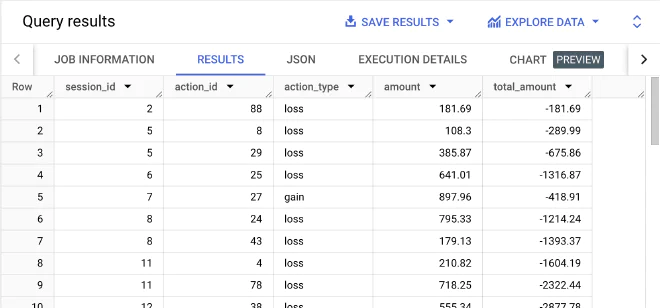
-- Question Number 6: Balance per Game
SELECTsession_id,action_id,action_type,amount,SUM(CASEWHENaction_type="gain"THENamountELSE-amountEND)OVER(ORDERBYsession_id,action_id)AStotal_amountFROM`teak-ellipse-401213.Arena.session_details`ASsession_detailsORDERBYsession_id,action_id
How many game sessions ended with a profit, how many game sessions ended with a loss, and how many ended in a draw?
Honestly, I prefer to avoid hard-coding column values in the query itself. This might be a classic case for integrating Python to check the values in the `action_type` column. For our purposes, I checked them in a separate query.
-- Question Number 7: Action Type Stats
-- Check distinct values of 'action_type'
SELECTDISTINCTaction_typeFROM`teak-ellipse-401213.Arena.session_details`ASsession_details;SELECTCOUNTIF(action_type='gain')ASprofit_total,COUNTIF(action_type='loss')ASloss_totalFROM`teak-ellipse-401213.Arena.session_details`ASsession_details;
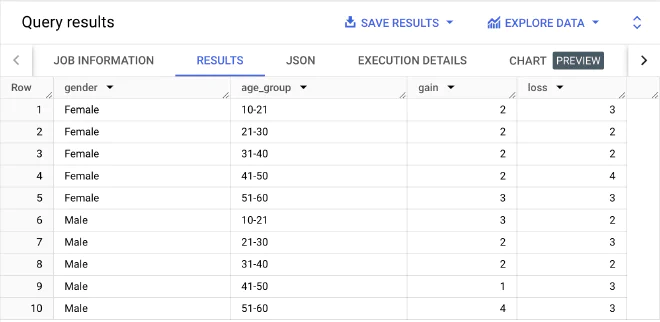
How many game sessions ended with a profit, how many game sessions ended with a loss, and how many ended in a draw. Break down the result for each gender and age group.
-- Question Number 8: Game Sessions Stats
WITHgame_statsAS(SELECTgender,age_group,action_type,game_idFROM`teak-ellipse-401213.Arena.session_details`ASsession_detailsJOIN`teak-ellipse-401213.Arena.game_sessions`ASgame_sessionsONsession_details.session_id=game_sessions.session_idJOIN`teak-ellipse-401213.Arena.players`ASplayersONgame_sessions.player_id=players.player_id)SELECT*FROMgame_statsPIVOT(COUNT(DISTINCTgame_id)FORaction_typeIN('gain','loss'))ORDERBYgender,age_group
Question Nine - Total Profit/Loss for each player #
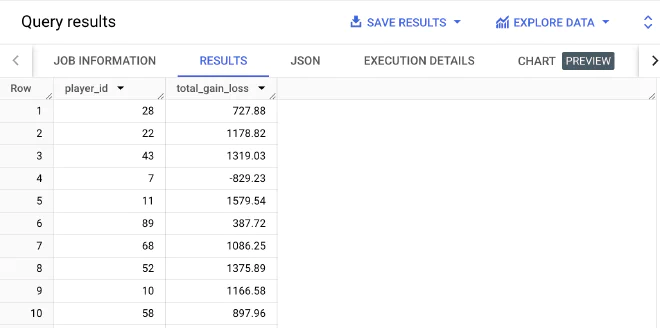
What is the total profit/loss amount for each player?
-- Question Number 9: Total Profit/Loss for each player
SELECTplayer_id,SUM(profit)AStotal_gain_lossFROM(SELECTplayers.player_id,IF(action_type='gain',amount,-amount)ASprofit,FROM`teak-ellipse-401213.Arena.session_details`ASsession_detailsJOIN`teak-ellipse-401213.Arena.game_sessions`ASgame_sessionsONsession_details.session_id=game_sessions.session_idJOIN`teak-ellipse-401213.Arena.players`ASplayersONgame_sessions.player_id=players.player_id)GROUPBYplayer_id
When a player wins, the house loses, and when a player loses, the house wins. Based on the available information, is the company currently in profit or loss?
At first, I wasn’t sure how to approach this question, and I started building subqueries. After a while, I realized it was a classic case of aggregate operations with `CASE` inside them.
-- Question Number 10: House Profit
SELECTSUM(CASEWHENaction_type='loss'THENamountELSE0END)AShouse_gains,-SUM(CASEWHENaction_type='gain'THENamountELSE0END)AShouse_losses,SUM(CASEWHENaction_type='loss'THENamountELSE0END)-SUM(CASEWHENaction_type='gain'THENamountELSE0END)ASoverall_gain_lossFROM`teak-ellipse-401213.Arena.session_details`;
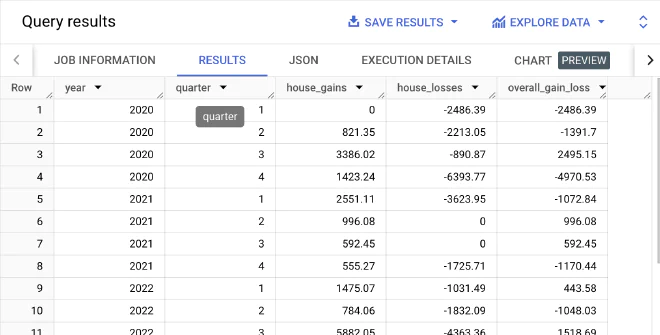
Present the company's profits/losses by year and quarter.
In this query, I first noticed a feature unique to BigQuery: you don’t have to repeat the aggregate operations from the `SELECT` inside the `GROUP BY`. It’s a clever feature I didn’t know existed, and it makes the code more readable.
-- Question Number 11: House Earnings by Quarters
SELECTEXTRACT(YEARFROMsession_begin_date)asyear,EXTRACT(QUARTERFROMsession_begin_date)asquarter,SUM(CASEWHENaction_type='loss'THENamountELSE0END)AShouse_gains,-SUM(CASEWHENaction_type='gain'THENamountELSE0END)AShouse_losses,SUM(CASEWHENaction_type='loss'THENamountELSE0END)-SUM(CASEWHENaction_type='gain'THENamountELSE0END)ASoverall_gain_lossFROM`teak-ellipse-401213.Arena.session_details`ASsession_detailsJOIN`teak-ellipse-401213.Arena.game_sessions`ASgame_sessionsONsession_details.session_id=game_sessions.session_idGROUPBYyear,quarter-- using aliases in GROUP BY, unique to BigQuery
ORDERBYyear,quarter
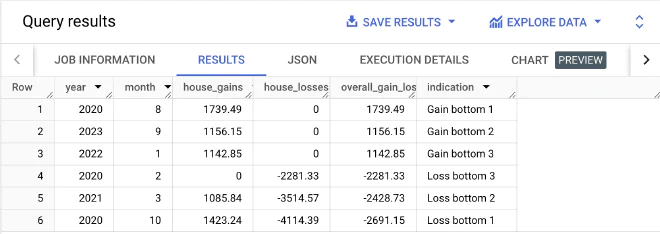
Present the company's top 3 best and worst months (in terms of profit and loss).
I decided to split the query into three parts: first, retrieve the data as in the previous question. Then, add numbering, and in the third part, retrieve the relevant numbered rows.
-- Question Number 12: Best / Worst 3 Months
WITHMonthEarningsAS(SELECTEXTRACT(YEARFROMsession_begin_date)asyear,EXTRACT(MONTHFROMsession_begin_date)asmonth,SUM(CASEWHENaction_type='loss'THENamountELSE0END)AShouse_gains,-SUM(CASEWHENaction_type='gain'THENamountELSE0END)AShouse_losses,SUM(CASEWHENaction_type='loss'THENamountELSE0END)-SUM(CASEWHENaction_type='gain'THENamountELSE0END)ASoverall_gain_lossFROM`teak-ellipse-401213.Arena.session_details`ASsession_detailsJOIN`teak-ellipse-401213.Arena.game_sessions`ASgame_sessionsONsession_details.session_id=game_sessions.session_idGROUPBYyear,MONTHORDERBYoverall_gain_loss),RankedResultsAS(SELECTyear,month,house_gains,house_losses,overall_gain_loss,ROW_NUMBER()OVER(ORDERBYoverall_gain_lossASC)asasc_row_num,ROW_NUMBER()OVER(ORDERBYoverall_gain_lossDESC)asdesc_row_numFROMMonthEarnings)SELECTyear,month,house_gains,house_losses,overall_gain_loss,CASEWHENasc_row_num<=3THENCONCAT('Loss bottom ',CAST(asc_row_numASSTRING))WHENdesc_row_num<=3THENCONCAT('Gain bottom ',CAST(desc_row_numASSTRING))ELSENULLENDasindicationFROMRankedResultsWHEREasc_row_num<=3ORdesc_row_num<=3
I highly recommend using BigQuery for personal projects and learning. Personally, I learned quite a bit from this project, and I hope I’ve managed to convey what makes this tool unique and what it can do.