Commit with GPT 🪄
“We love documenting our code changes” (said no one ever). Meet GPiT, your personal assistant for documenting code changes quickly, securely, and conveniently. In this post, I’ll walk through my learning process and explain each step until the package we’ve built is available to download on PyPI.
I put together a short video demonstrating how to use the GPiT library. It shows a repository with changes that are fed into GPT-4, which generates text explaining what changed in the code. The user can automatically generate new text, edit it, and push the changes to the repository.
Before Anything Else 🕊️ #
We’ve been in the midst of a war for more than four months now, and like many of my friends, I’m taking part as an active reservist. I decided to return to writing, attend meetups, and meet new people. I had many doubts about this decision, but eventually I realized that this would help me see the light and bring as much normalcy as possible into my life. I sincerely hope that all the hostages return safely, along with the soldiers who sacrifice so much for the country.
Version Control 💾 #
Background #
We all know the situation: we’re writing a document, want to save a version, and add a character to distinguish the new one: document1, document2, document3, and so on. This way of working leads to excess data, duplication, undocumented changes, and, above all, a mess we can’t control. Now imagine the same thing, but with a document we’re writing together with several other people.
Version control does what its name suggests: it manages changes to files and lets us work on the same files with other developers. During development, changes are managed locally on our computer. When we want to upload those changes to the shared project, we work with a distributed version control system, such as Git.
git diff #
To understand how Git tracks code changes, let’s take a basic example. We’ll open a new folder we’ve created called /learn-git and run the command git init to initialize a new, empty repository.
~/learn-git$ git init
Initialized empty Git repository in ~/learn-git/.git/
Next, we’ll use the echo command to create a text file containing “hello”. We’ll add the new file to the repository.
~/learn-git$ echo hello > file.txt
~/learn-git$ git add .
~/learn-git$ git commit -m "initial"
[master (root-commit) 865ed74] initial
 1 file changed, 1 insertion(+)
 create mode 100644 file.txt
After committing an initial version, we’ll make a small change. We’ll add the word “world” to “hello”, so the text file now contains “hello world” on the first line. Now that there’s a difference between the local version and the version in the repository, we’ll check what changed using the git diff command.
~/learn-git$ git diff
diff --git a/file.txt b/file.txt
index ce01362..3b18e51 100644
--- a/file.txt
+++ b/file.txt
@@ -1 +1 @@
-hello
+hello world
What we’re seeing is a comparison between two versions of the same file, a and b, along with the change itself: deleting the first line and replacing it with another. Later, we’ll use the same command, with a few small additions, to feed the code changes into the model.
Language Model 🎙️ #
Prompt Engineering #
We’ve finished the first part, where we check what changed in the code. The second step is to experiment with different instructions, or prompts, in an attempt to find the right prompt for automatic documentation using a language model. After many attempts, here’s what I came up with:
I need a detailed and specific commit message for the following Git code changes.
The message should reflect the actual code modifications, improvements, or fixes made.
Please provide the message in JSON format, with distinct sections for a summary
message, bullet points detailing specific changes, and any necessary warnings about
the code, such as potential issues or areas needing attention.

Changes:
--- a/file.txt
+++ b/file.txt
@@ -1 +1 @@
-hello
+hello world

The response should be technically specific, aligning closely with the provided code changes, and
avoiding generic or placeholder text.
Be concise and on-point, without providing excess information.
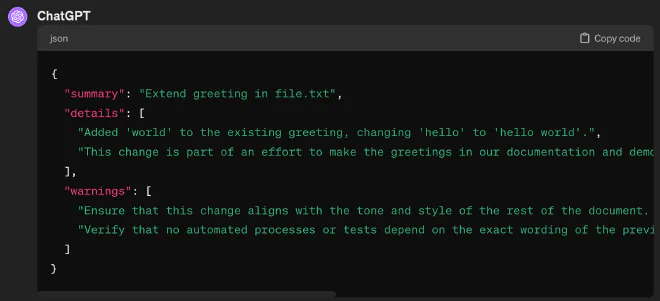
For a simple demonstration, I fed in the small change we made to the file.txt file. I suggest taking a look at the image I’ve included. Think of how much time and frustration this could save us: a lot, right?
GPT-4 Turbo’s JSON Mode #
I like to think of large language models as wild horses. We can’t always predict how they’ll behave. If we want to call a language model and use its output, we need to force it to respond in a format we can easily read. You can see this in the prompt I wrote: Please provide the message in JSON format. Still, we can’t be certain this approach will always work. Sometimes we might get an introductory sentence that makes things harder for us, as in this case:

In November 2023, OpenAI released the fast GPT-4 Turbo model. Compared with GPT-4, the new model is faster and cheaper. The more significant news is that the new model can return output in valid JSON format by specifying response_format of type json_object. This was a development that advanced our ability to integrate the GPT language model into systems.
To make this mode work, I decided to add further guidance to our prompt, down to the last detail: the JSON format we want in the output and an exact explanation of each field. This additional guidance gives us consistent output with similar behavior.
...
Please format the response as follows:
{{
    "message": "A concise summary, specifically describing the key change or improvement. Must be 72 chars or less",
    "bullets": [
        "Specific detail about a particular code change, including file and function names if applicable",
        "Description of another specific change, noting how it affects the functionality or structure of the code",
        ...
    ],
    "warnings": [
        "Optional. Necessary warnings or notes of caution about specific parts of the changes",
        ...
    ]
}}
Let’s Code 🤩 #
Introduction #
I split the implementation into independent blocks, which we’ll develop separately and connect at the end. It’s important to note that I chose to focus on the project’s key code sections. For the full project, I invite you to visit the Github Repository, where I’ve documented the code and included a usage demonstration. Shall we get started?
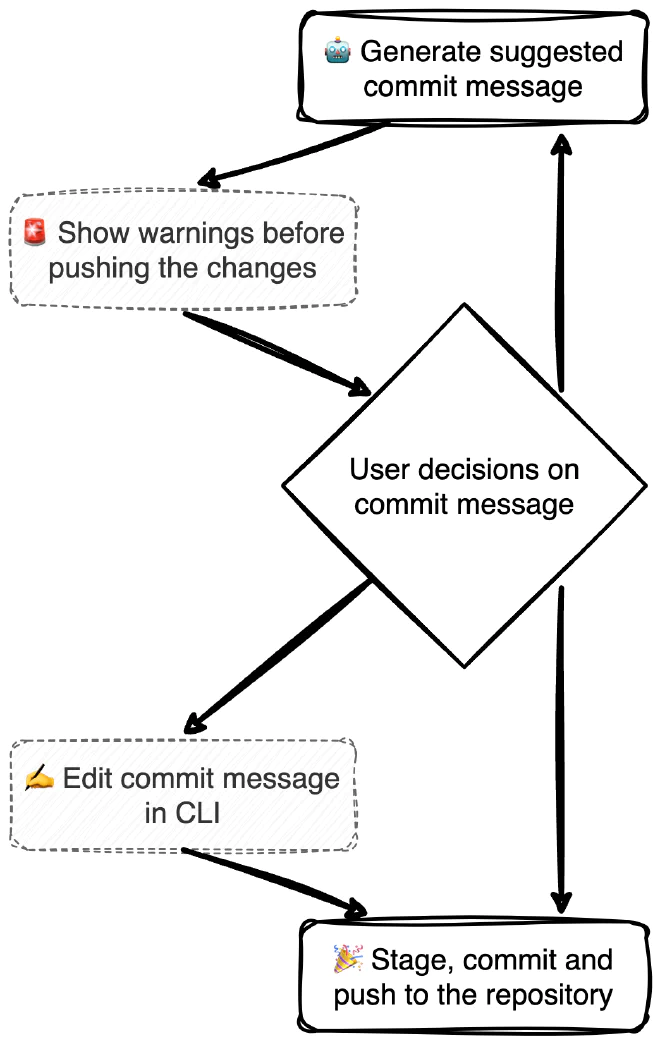
🤖 Generate suggested commit message #
To find out what changed, we’ll compare each staged file with its version in the last commit. Using name-only--, we’ll get a list of paths, relative to the repository’s location, for files that have changed since the last commit:
git diff --cached --name-only
Once we have the file paths, we’ll check what actually changed in each file.
git diff --cached { path }
The subprocess module lets us run shell commands and retrieve their output. The get_git_diffs function implements the commands I described here using the check_output function:
# class: `git_commands`
def get_git_diffs():
    """Get diffs of staged changes in the repository."""
    subprocess.run(['git', 'add', '.'])  # Ensure all changes are staged
    changed_files = subprocess.check_output(['git', 'diff', '--cached', '--name-only']).decode().splitlines()
    diff_output = ""

    for file in changed_files:
        diff_output += f"\n📄 {file}\n"
        diff_output += "-" * len(file) + "\n"
        file_diff = subprocess.check_output(['git', 'diff', '--cached', file]).decode()
        diff_output += file_diff + "\n"

    return diff_output
Now that we have the changes each file has undergone since the last commit, we can query GPT-4 and generate a commit message:
- API Key: We’ll call OpenAI through a simple HTTPS request to the server. Remember to save the API key in a local
env.file beforehand. You can also use a shell command calledexportto store the key temporarily. - Prompt: We’ll use the same prompt we used at the start during prompt engineering. As a reminder, we added JSON that specifies the output structure more precisely:
messagewill contain the essence of the change,bulletswill contain a concise breakdown of the changes, andwarningswill contain warnings before uploading the code. In my experience, the more guidance we give the model, up to a point, the more accurate and consistent the results. - API Call: We’ll make a
POSTrequest to OpenAI. Notice that we’ve setjson_objectfor the model’s output format. - Processing the result: We’ll extract the JSON from the response and return the result.
# class: `openai_integration`
def generate_commit_message(diffs):
    """Generate a commit message using GPT-4 and format the response as JSON."""
    # 1. Environment Setup: Retrieve API Key
    openai_api_key = os.getenv("OPENAI_API_KEY")
    headers = {
        'Content-Type': 'application/json',
        'Authorization': f'Bearer {openai_api_key}'
    }

    # 2. Prompt Construction: Define the request for GPT-4
    prompt = f"""
        I need a detailed and specific commit message for the following Git code changes.
        The message should reflect the actual code modifications, improvements, or fixes made.
        Please provide the message in JSON format, with distinct sections for a summary
        message, bullet points detailing specific changes, and any necessary warnings about
        the code, such as potential issues or areas needing attention.

        Changes:
        {diffs}

        Please format the response as follows:
        {{
            "message": "A concise summary, specifically describing the key change or improvement. Must be 72 chars or less",
            "bullets": [
                "Specific detail about a particular code change, including file and function names if applicable",
                "Description of another specific change, noting how it affects the functionality or structure of the code",
                ...
            ],
            "warnings": [
                "Optional. Necessary warnings or notes of caution about specific parts of the changes",
                ...
            ]
        }}

        The response should be technically specific, aligning closely with the provided code changes, and avoiding generic or placeholder text.
        Be concise and on-point, without providing excess information.
    """

    # 3. API Call: Send the request to OpenAI's API
    data = {
        "model": "gpt-4-1106-preview",
        "messages": [
            {"role": "system", "content": "You are an assistant, and you only reply with JSON."},
            {"role": "user", "content": prompt}
        ],
        "response_format": {
            "type": "json_object"
        }
    }

    response = requests.post(
        'https://api.openai.com/v1/chat/completions',
        headers=headers,
        data=json.dumps(data)
    )

    # 4. Response Handling: Parse and format the API response
    response_json = response.json()
    response_text = response_json['choices'][0]['message']['content']
    try:
        formatted_response = json.loads(response_text)
    except json.JSONDecodeError:
        formatted_response = {"message": "Failed to parse response", "bullets": []}

    return formatted_response
🚨 Show warnings before pushing the changes #
Before showing the commit message to the user, we’ll display warnings that the model considered relevant. This helped me catch bugs and mistakes I didn’t actually want to include in a commit, such as API keys in the code, unclosed parentheses, and typos. To do this, we’ll access the key named warnings and print the list of sentences stored in it.
# class: `main`
suggested_message_json = generate_commit_message(diffs)
suggested_message_json.get("warnings", [])
print_warnings(warnings)

# class: `cli_utilities`
def print_warnings(warnings):
    """Prints warnings in a formatted manner."""
    if warnings:
        for warning in warnings:
            print(f"- {warning}")
    else:
        print("\n✅ No warnings.")
🤔 User decisions on commit message #
The format_commit_message_from_json function will process the JSON we received from GPT. Then we’ll display it to the user and let them choose:
- 1️⃣ - Use the suggested documentation.
- 2️⃣ - Request alternative wording to describe the changes.
- 3️⃣ - Manually edit the commit message.
# class: `openai_integration`
def format_commit_message_from_json(commit_json):
    """Format the commit message from JSON to a string."""
    message_str = commit_json.get("message", "")
    bullets = commit_json.get("bullets", [])

    formatted_bullets = "\n".join(f"- {bullet}" for bullet in bullets)
    return f"{message_str}\n\n{formatted_bullets}"
# class: `main`
print("📬 Suggested commit message:")
suggested_message = format_commit_message_from_json(suggested_message_json)
print(suggested_message)

print("\n👇 Choose an action:")
user_decision = input("1️⃣ Use the current commit message\n"
                      "2️⃣ Generate a new commit message\n"
                      "3️⃣ Edit the current commit message\n"
                      "Your choice (1/2/3): ").strip()

if user_decision == '1':
    commit_message = suggested_message
    break
elif user_decision == '2':
    continue
elif user_decision == '3':
    commit_message = edit_message_in_editor(suggested_message)
    break
else:
    print("❌ Invalid choice. Please enter 1, 2, or 3.")
✍️ Edit commit message in CLI #
Aside from editing, the code is self-explanatory. To be honest, it took me a while to figure out how I wanted to let the user edit the generated text, and I came across Nano, which allows editing directly in the CLI. We’ll save the generated text in a temporary file, open it in Nano, and read the result. Then we’ll delete the temporary file.
# class: `cli_utilities`
def edit_message_in_editor(message):
    """Open the message in a text editor (Nano) for editing."""
    with tempfile.NamedTemporaryFile(suffix=".tmp", delete=False, mode='w+') as tf:
        tf_path = tf.name
        tf.write(message)
        tf.flush()

    editor = os.getenv('EDITOR', 'nano')  # Use Nano or the default editor set in the environment
    subprocess.call([editor, tf_path])

    with open(tf_path, "r") as tf:
        edited_message = tf.read()

    os.remove(tf_path)  # Clean up the temporary file
    return edited_message
🎉 Stage, commit and push to the repository #
Once we have a message that explains the code change in simple terms, we can push it to the repository! If you look at the full code, you’ll see that I’ve added extra checks so we can handle edge cases.
# class: `git_commands`
def stage_changes():
    """Stage all changes in the repository."""
    subprocess.run(['git', 'add', '.'])

def commit_changes(commit_message):
    """Commit changes with a given message."""
    subprocess.run(['git', 'commit', '-m', commit_message])

def push_changes(branch_name='main'):
    """Push changes to the remote repository."""
    subprocess.run(['git', 'push', 'origin', branch_name])
Uploading GPiT to 🆙 PyPI #
Now that we’ve finished building GPiT’s building blocks, we can upload it as a library to the PyPI package index so we can download it using the pip install command.
setup.py #
The first file we’ll create defines the version of the package we’re uploading, its required libraries, the location of the main function, and other details about the developer and the project. Note that you can add a direct connection to the repository’s README.md, as I did in the full code. This file will sit outside the folder containing all the Python files that make up the library itself; it “manages” the process of uploading the library.
# class: `setup`
setup(
    name='gpit',
    version='0.0.3',
    packages=find_packages(),
    install_requires=[
        'requests',
    ],
    entry_points={
        'console_scripts': [
            'gpit=gpit.main:main',
        ],
    },
    author='Ofir Steinherz',
    author_email='ofir.steinherz@gmail.com',
    description='GPT-Powered Commit Assistance'
)
init__.py__ #
A file that marks a directory as a Python package, allowing its modules to be recognized and imported. In our case, it will exist but remain empty.
Makefile #
A Makefile helps with development workflows and makes work more efficient. I learned to use it as part of a CI/CD project, where it helped me streamline project builds with Github Actions. I’ve enjoyed using it ever since. We’ll use this file to chain shell commands so we can run them with one simple command rather than manually running them one after another.
install #
To make sure we’re uploading all the libraries needed to run our library to the site, we’ll run an installation command. Now you’re probably asking: what does that dot mean? Where are the library names? The interesting part is that the command looks at the setup.py file, where we’ve defined the libraries to install. This lets us double-check that everything is installed correctly.
install:
  #Install the package
	pip install .
clean #
To upload clean code without files generated by the previous version, we’ll need to delete files created while building that version, along with various metadata files.
clean:
	#Clean unnecessary package upload generated files
	rm -rf dist/
	rm -rf build/
	rm -rf *.egg-info
	find . -name '__pycache__' -exec rm -rf {} +
upload #
Before uploading the library to the site, we’ll make sure there are no old files left, once again, and then build our library and upload it!
upload:
	#Upload new version to PyPI
	rm -rf dist/
	python3 setup.py sdist bdist_wheel
	twine upload dist/*
Wrap-Up 🥳 #
We’re done! To recap, we learned how to track code changes using git diff, how to get output from the GPT-4 language model in a consistent format, and how to upload libraries to PyPI. See you in the next post!